
Smart Beds Assistance
On this page we will help you use the Auping Smart Bed and the associated Auping Connect app. You will find answers to frequently asked questions and useful tips to get the most out of your Auping Smart Base. You can also watch instructional videos on our website. YouTube Channel.
Auping Connect App
Auping Connect is easy to use. After install the app and the hub, it is important that your phone or tablet is connected to your WiFi network. Open the app and you will enter the basic screen for controlling the bed. The functions in the app are divided into 3 screens:
- Smart alarm
- Bed control
- snore detection
By default, the app opens on the screen you control. Navigate to the other screens using the icons at the bottom of the screen. You can switch between the different main screens by clicking on one of the icons at the bottom of the screen. The alarm clock icon, the bed icon, or the moon icon.
Bed Control
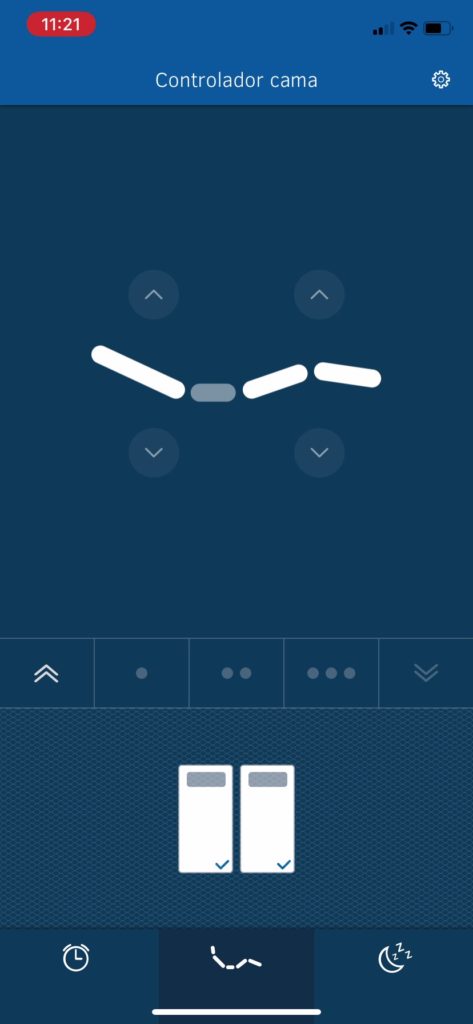
By default, the app opens on the screen you operate your bed with. Using the bed icons you select which side of the bed you want to adjust. Left, right or both.
Control individual motors on your Smart Base with the up and down arrows on the bed. Or, operate all motors at once with the buttons in the center to raise or lower the bed at once.
They remember your favorite position
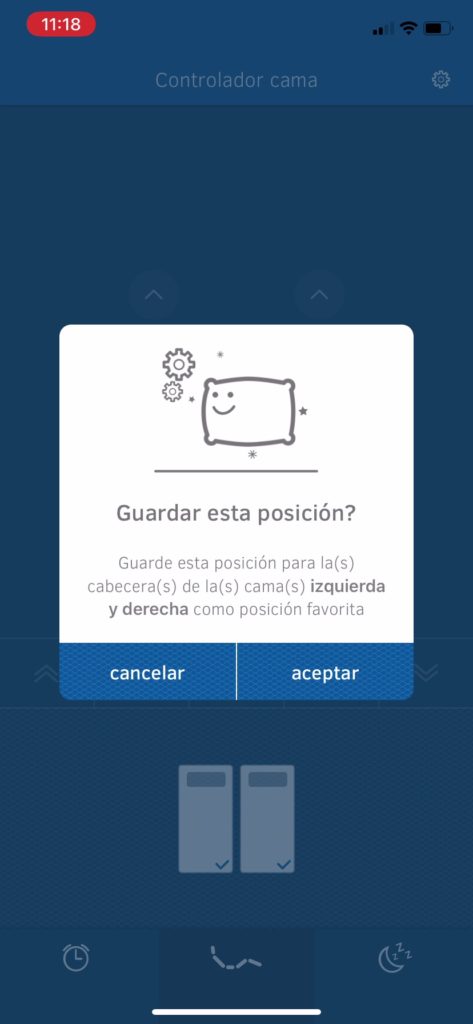
The dot icons on your screen allow you to save your favorite positions. Follow the instructions below to save your favorite settings.
Instructions:
Step 1: Adjust your bed to the desired position using the arrow keys.
Step 2: Press and hold one of the three dots in the center of the screen to save the location to your favorites.
Step 3: Choose 'accept' on the screen that now appears.
Your favorite setting is now saved. You can save three different favorite positions per side of the bed. Switch between your favorite positions by tapping the button.
You can easily change a favorite position by simply holding down one of the three dots and saving the new positions as favorites.
Smart alarm
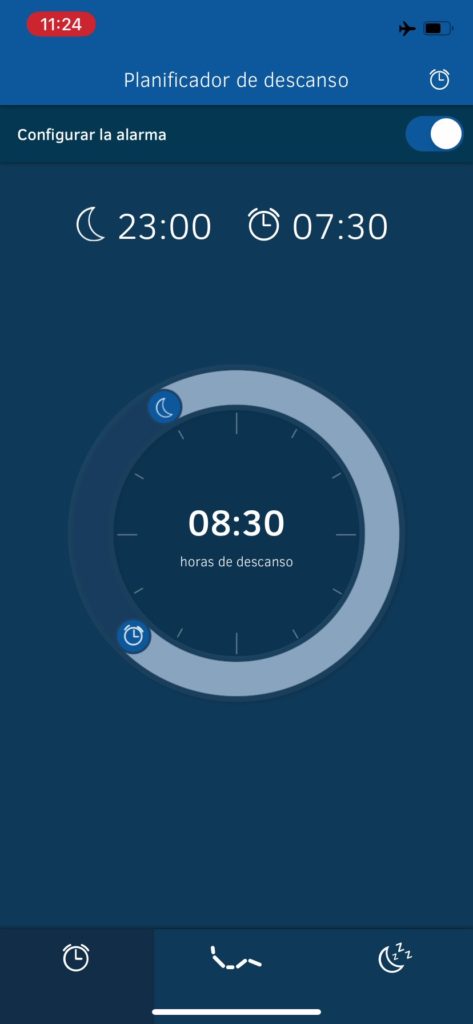
The Auping smart bed wakes you up in a pleasant way. There are several options for this. In the sleep planner, you can set the time you want to go to bed, the time you want to get up, and what kind of alarm clock you want to use to wake you up.
Setting the sleep timer
Press the snooze button on the bottom left to open the sleep planner. Activate or deactivate the planner with the button on the top right. Set your desired bedtime and wake-up time with the dial. The total sleep time is displayed in the center.
If you've set the alarm clock, an icon in the status bar will show you which alarm clock you've set and which half of the bed you've set the silent alarm clock for.
configurations
Clicking on the alarm clock icon in the top right corner will take you to the sleep planner settings.
Here you can configure the following:
- On which days of the week you want to use the alarm clock with sound.
- Do you want to wake up with sound or movement?
- Which side of the bed do you set the smart alarm clock for?
configurations
The application has several types of alarm clock:
1. Alarm with sound: the standard alarm clock.
You can select a ringtone and choose whether to activate the snooze function or not. Please note that this alarm clock requires your phone's sound to be turned on.
2. Motion alarm: wake up silently.
With this alarm clock, you wake up thanks to the movement of your bed. The back of your bed rises slowly at the preset time.
3. Smart alarm: wake up during light sleep.
Waking up from a deep sleep is not pleasant. This smart alarm wakes you up during light sleep, within half an hour before the scheduled alarm time. The slider allows you to adjust how quickly the app reacts to sound. A high sensitivity will react faster to sound than a low sensitivity.
4. Bedtime reminder: Go to bed on time.
Set a bedtime to keep your sleep pattern regular. Select when you want to receive the reminder.
Anti-snoring function
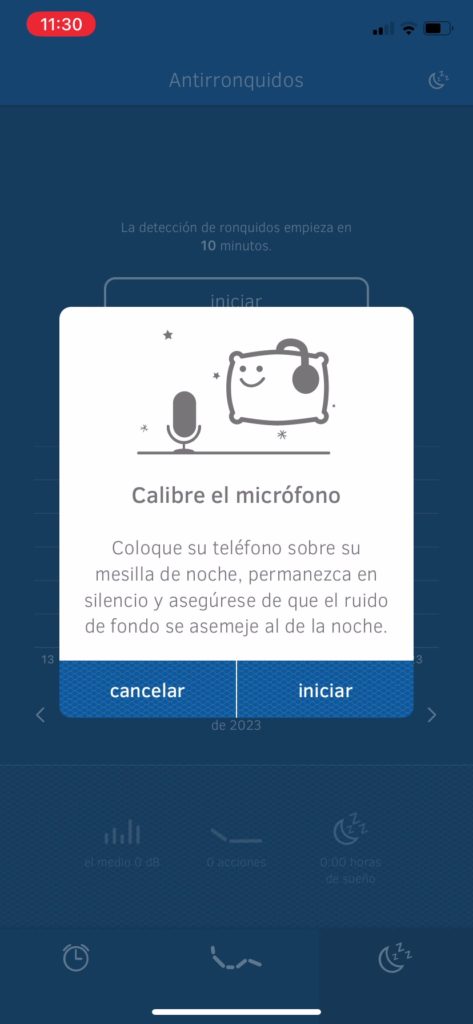
Enjoy a peaceful night's sleep without a snoring partner.
Once you have activated the anti-snoring function, place your mobile phone on the nightstand next to your bed, at the height of your head.
How does it work?
The Auping Connect app measures the frequency and pattern of sound volume (dB) in your room. When this pattern matches that of snoring, your bed will react by slightly raising the headboard. This will open your airway and reduce snoring. Another option is to allow the headboard of the bed to move briefly so that you turn to one side.
Privacy in the room
Your privacy is important to us. Therefore, we will not listen to or record sounds in your room. No data will be stored or used for any purpose other than activating your bed in case of snoring.
Snore detection screen
The main screen of the so-called snore detector contains several functions:
- the start button
- snoring values
- bed side selection
- adjustments
the start button
With the start button, you activate the snore detection. It will automatically stop the next morning when your alarm goes off. If you do not set an alarm, you can turn off the snore detection at any time with the stop button.
Snoring values
You will see three snoring values:
- The measured noise volumes
- The number of times the app activated the bed during the previous night
- The number of hours of sleep
Bed Side Selection
In the settings, you select the side of the bed that should react to snoring noises.
Settings
The snore icon in the bottom right corner takes you to the snore detection settings menu. Here you can configure the following:
- Which snoring function do you want to use?
- the sensibility
- After how long should snoring detection begin?
- bed side selection
- calibration
Anti-snoring mode
In the settings menu, select what you want the bed to do when it detects snoring sounds.
Raise: The bed is raised slightly.
Push: The bed moves briefly.
The anti-snoring function only works if the bed is in a flat position when you lie down.
Sensitivity
By choosing low/medium/high, you can adjust the sensitivity of the anti-snoring feature. The higher the sensitivity, the faster the app will respond. Ambient noise also affects the anti-snoring feature, and microphone sensitivity varies from phone to phone. That's why we perform a microphone calibration. So experiment with this a few times.
Start Time
With the timer, you can set how long it takes for snore detection to begin. Most people fall asleep after about 20 minutes. If you want snore detection to begin immediately when you press "start," set the start time to 0 minutes.
The rear section of the mesh base is raised when the anti-snore feature is used.
When the anti-snore function is activated, the rear section is slightly raised. Please note: leave the mesh base in this position, otherwise the actions will be minimal. You will feel the mesh base move less or almost not at all.
Why does the rear section have to be raised a little?
We raise the back of the bed to free the airways and thus reduce snoring. The motors also need a few seconds to start the mesh base. Because the motors are already in a certain position, the action can be performed immediately.
Explanation of the anti-snoring function measurement method
Your privacy is important to us. Therefore, we will not listen to or record sounds in your room. No data will be stored or used for any purpose other than activating your bed in case of snoring.
The Auping Connect app measures the sound volume (dB), frequency and pattern in your room. If this corresponds to the snoring pattern, your bed will react after a while by slightly raising the head of the bed.
To distinguish between snoring and another sound, the app listens to the frequency, duration, and repetition of the sound. If a series of matching sounds is detected, the snore detection system takes action.
The series of snoring sounds is measured over 1 minute. The series of snoring sounds must occur within one minute. If you stop snoring within less than one minute, snore detection will not be activated.
Ambient sounds can also trigger the snore detection. This is unavoidable, but will be limited as much as possible by the app's algorithm. Therefore, depending on the sensitivity set, it may take up to a minute before the snore detection feature is activated.
The sensitivity of phone microphones is different, and this is important for the anti-snoring feature. The algorithm has been adjusted for this and the snoring prevention feature works well for most phones at medium sensitivity. If you feel that the snoring detection is too fast or not fast enough, adjust the sensitivity.
Reset Bed Settings
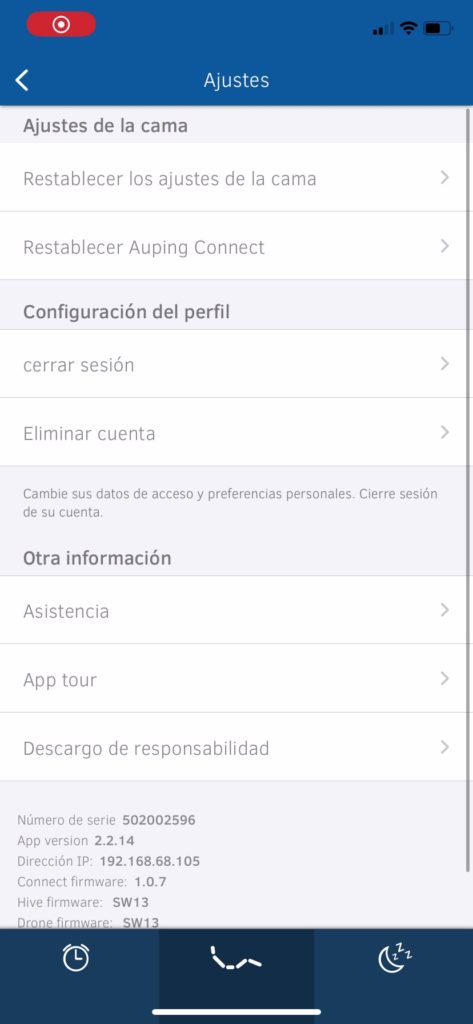
If you want to make changes to the type of bed you have installed, for example because you have purchased a different mattress, it is not necessary to do the entire installation again.
Go to settings.
And select Reset Bed.
Then follow the instructions on the screen.
FAQ
Auping Connect App
How to operate my Auping Smart Base
You can operate the Auping Smart Base using the supplied remote control or the Auping Connect app on a smart device. The app can be downloaded from the App Store and Google Play Store.
Auping Smart Base Features
The Auping Smart Base allows you to easily adjust your bed using a smartphone or tablet. You can quickly switch between individual and simultaneous adjustment of two bed bases. The alarm function allows you to set a traditional alarm with sound or raise the back section when you want to get up. You can now also save several preferred positions so that your body always gets the support it needs.
Does my current remote still work?
Unfortunately, the old remote controls no longer work due to the upgrade (CBU5) of our smart bed bases. When you purchase an Auping Smart Base (upgrade set), you will receive new remote controls that correspond to the new smart bed base.
My partner installed the Connect app on his smartphone. Do I still need that specific phone to use my Smart Base?
No, both you and your partner can install the Connect app on your own smartphones and/or tablets and customize the features. You can set your own alarm or anti-snore feature on each mobile device, or if you have two adjustable bases, you can choose to adjust both sides of the bed in sync.
I don't have Wi-Fi, can I still install and use Auping Connect?
Unfortunately, without Wi-Fi, you cannot install or use the Auping Connect app. It is recommended to use Wi-Fi so that the Smart Base can receive updates and upgrades.
Can the Auping Connect app be pre-configured and then installed without Wi-Fi?
No, a Wi-Fi connection through your router is required during installation. You must download the app and complete the installation yourself. Installation updates are stored in the cloud and downloaded automatically as long as there is an active Wi-Fi connection.
What sleep data is recorded and how?
We store the following data in the cloud:
- Email (as entered in the application).
- Name (as entered in the application).
- Phone location (so that the email is sent in the correct language).
Snoring data (parameterized in number of snores per quarter hour) -> With the current architecture/implementation, this data cannot be traced back to a user.
Anti-snoring function
How does the anti-snoring function work?
Snoring occurs due to a partial narrowing of the airway during sleep. The constriction occurs because the softer parts of your palate, such as your tongue, fall downwards when you sleep on your back. Auping's anti-snoring mode can help you reduce snoring in two ways:
The elevation feature tilts your body slightly forward to open your airway more, which stops snoring.
The push function is a kind of position trainer that teaches you not to sleep on your back. When you lie on your back and snore, the bed gives you a little push. This wakes you up and makes you turn to one side. After a few weeks, you will automatically sleep less on your back and therefore snore less.
How long does the anti-snoring function remain elevated?
Elevation: 5 minutes
Push: Go down immediately after pushing the snorer.
What is the adjustment angle of the anti-snoring function?
Elevation: approximately 5 degrees, depending on weight.
Thrust: Sharper, enough for the frame to move freely.
In both cases, the back section will completely return to its position after the process. So if someone sleeps with the back section partially adjusted for some reason, such as heartburn, this can work against them.
My bed rises when the anti-snore mode is activated
This is normal. If you have selected the lift function and snore detection is activated, the bed will adjust upwards. This will help you breathe more easily.
Don't want the rear section to rise when anti-snore mode is activated? So try the 'push' setting instead of 'lift'.
- Go to the snore detection settings (via the snore icon in the top right corner).
- Select 'push' in 'anti-snoring mode'.
- The selected function will be displayed in blue.
- When activated, the rear section will give thrusts.
Snore detection not responding
Make sure you have tapped “home.”
Check if any sound is being measured - there is a sound icon with a dB value below it displayed in the middle of the screen. If this value is set to 0, no measurements will be taken. Close the app and restart it. If this does not work, restart your phone.
Next, check if snoring is being measured. You can see how many snores were measured in the center of the screen. By tapping on a bar, you can see how many snores were measured. If this number is 0 or very low, the sensitivity is set too low.
Go to the snore detection settings (via the snore icon in the top right corner) and check that the snore detection sensitivity is set correctly. The default setting is medium, but this isn't sensitive enough for some devices. Try setting the button to "high."
Go to the snore detection settings (via the snore icon in the top right corner) and check that the timer is on. Use the slider to set the time at which snore detection should begin. Most users fall asleep within about 20 minutes. When you start snore detection, you'll see a timer on the screen indicating how many minutes are left until snore detection begins.
Snore detection responds too quickly
- Go to the snore detection settings (via the snore icon in the top right corner).
- Check that the snore detection sensitivity is set correctly. The default setting is medium, but it's too sensitive for some devices. Try setting the button to "low."
The wrong side of the bed answers
Make sure the correct side of the bed is selected in the snore detection settings. The pillow icon in the app will indicate whether the bed side is left or right.
Snore detection responds to other sounds
We believe that your privacy is important. Therefore, we will never listen to or record any sounds in your bedroom and no data will be stored or used for other purposes. This means that other sounds can also trigger the anti-snoring mode.
Do not start snore detection until you fall asleep.
Prevent the anti-snore mode from responding to sounds before you fall asleep by using the timer. Most users fall asleep within about 20 minutes.
Decrease the sensitivity of the snore detection; go to the snore detection settings (via the snore icon in the top right corner) and check that the snore detection sensitivity is set correctly. The default setting is in the middle, but this is too sensitive for some devices. Then, try the "low" setting.
Make sure the phone is close to your head and the phone's microphone is facing your head.
Smart alarm
How does the smart alarm functionality work?
After calibrating the noise level in the room, the app detects if the noise level in the room exceeds the noise level set during calibration starting from half an hour before the set alarm time when the alarm functionality has been set. If this happens, the rear section rises to wake the sleeper.
Does the alarm time automatically adjust to daylight saving time like your phone does?
Yes, the time is adjusted automatically.
Suppose you sleep in a 45-degree position due to acid reflux; will the alarm still work? Will the bed be elevated?
Yes, the alarm works from the current engine position. It doesn't switch to a memory mode or anything like that. The engine simply runs for x seconds.
What is the adjustment angle for the smart alarm function?
10 to 12 degrees, depending on weight.
My bed doesn't rise when the alarm goes off
- Go to the sleep planner.
- You must use the button every night to activate the silent alarm.
- Go to your sleep planner settings (via the alarm icon in the top right corner).
- Check that the “Motion Alarm” switch is on.
- Make sure the correct side of the bed is selected.
My bed rises when the alarm goes off
- Go to the sleep planner.
- Go to your sleep planner settings (via the alarm icon in the top right corner).
- Check that the “Motion Alarm” switch is on.
- Make sure the correct side of the bed is selected.
Other side of the bed rises when waking up
- Go to the sleep planner.
- Go to your sleep planner settings (via the alarm icon in the top right corner).
- Check that the “Motion Alarm” switch is on.
- Make sure the correct side of the bed is selected.
- If the bed side is selected correctly but the wrong bed is responding, reinstall your bed.
- Go to settings (via the icon in the top right corner).
- Select 'Reconfigure bed settings'.
The alarm with sound does not sound
- Go to the sleep planner.
- Go to your sleep planner settings (via the alarm icon in the top right corner).
- Check that the “Alarm with sound” switch is on.
- Make sure the correct days are set.
Do you have iOS? Make sure your phone isn't on silent mode so you can hear the Auping Connect app alarm. Unfortunately, the Auping Connect app doesn't work in Apple's "Do Not Disturb" mode.
Do you have an Android? The Auping Connect app sound can be adjusted by setting the ringtone volume ("Call," not "Media" or "Alarm"). The ringtone volume should not be set to zero.
The alarm sounds too early
- Go to the sleep planner.
- Go to your sleep planner settings (via the alarm icon in the top right corner).
- Check that the “Smart Alarm” switch is on.
This smart alarm wakes you up during your light sleep phase, half an hour before the alarm time.
Smart alarm does not sound
- Go to the sleep planner.
- Go to your sleep planner settings (via the alarm icon in the top right corner).
- Check that the “Smart Alarm” switch is on.
Smart alarm goes off too early
- Go to the sleep planner.
- Go to your sleep planner settings (via the alarm icon in the top right corner).
- Check that the “Smart Alarm” switch is on.
Memory Function
How does the memory function work?
The bed control measures the number of rotations of each motor. The control therefore knows how much the motor has adjusted the bed surface and therefore the position of your bed. This process takes place at every adjustment, so the control always knows where each bed surface is at all times. This allows you to move from any bed position to any of the three memory modes.
The bed control keeps track of how many revolutions each motor makes and in which direction. When a memory is saved, these numbers are stored in a table.
The next time you want to return to that position, the control knows exactly how each motor should move and by how much. It is important to note that small counting errors can occur in memory mode. You won't notice this in normal use, as the motor is set to '0' when the bed is level. However, if the bed is adjusted many times without leveling, the accuracy will decrease until the bed is leveled again.
Are the preferences in the app synced with the remote and vice versa?
The memory modes are identical on the remote and the app. They do not need to be synchronized as they are in the CBU itself. Each setting has three memory modes: Hive, Drone and Synchronized. So for a double bed combination, there are a total of nine memory modes. The app and remote just need to say:
«Drone, go to memory mode 3»
o
«Synchronized, go to memory mode 1».